Creating an heightmap for the game world
(Originally posted on Mastodon)
I searched for some time a tool to author a game world heightmap. There are different possible approaches.
- You could draw a heightmap in an image editor, but good luck with that
- You can use tools made to interactively shape a terrain, such as World Creator
- You can use node-based generators which combine mathematical functions to generate a heightmap, such as World Machine or Houdini
- There are also voxel editors such as Avoyd but I didn’t find one with practical edition tools for a big terrain
Now if you don’t have a budget to pay for a commercial tool, it limits the options. I’ve quickly evaluated the following free and open-source tools: HeightMap Editor, World Painter, World Synth, and Hesiod.
And I stopped my search here, when I discovered Hesiod. It’s a node-based heightmap generator, and the only free tool I’ve found that I think can really work for the kind of world I want to create.
Hesiod is surprisingly complete and usable, given it’s mostly developed by a single person. It has its quirks, some things are not finished, some things are missing, but overall it’s a great tool.
Here is a demo of the kind of thing that can be done with a graph of nodes. It’s not really intuitive to begin with, you may wonder “how can you even make a terrain out of a node graph?” and “where do I start?”, but once you get the principles, it’s really powerful. Here I draw some lines that represent the ridge of a moutain chain, and the configured nodes will “extrude” them to create the mountains, and then generate random noise to add details. Finally, an erosion simulation makes it look more realistic (but this last part is still a weak point of Hesiod: it’s there, it kind of works, but I couldn’t get results anything close to what World Machine can do for example).
Here is an early attempt to create my game world, showing how each group of nodes impacts the result:
To give an idea of scales, the map is 16x16km, which means the cliffs on the coast are about 300m high, and I don’t know exactly but the highest mount probably 2km high.
In-game we are really much closer than this preview. So the heightmap needs to be exported at high resolution (my target is 8192x8192, which means one point every 2m of terrain).
I couldn’t achieve such details with real Earth elevation maps, and of course I can’t draw that kind of data by hand.
A difficulty with node-based tool is to find ways to mix your authoring (I need a moutain there, a river here) with “automatic” details generation. A lot of examples begin with a completely random landscape ; you can still choose the density of mountains and things like that, but for example you can not choose where each mountain goes. Instead, the process I’ve come up with is to draw, simple images to define what I want, such as an island shape, ridge line of mountains, path of rivers. These are drawn by hand in Gimp.
Here are all the layers I’ve used: the island in white, mountain ridges in black, and rivers in dark blue.
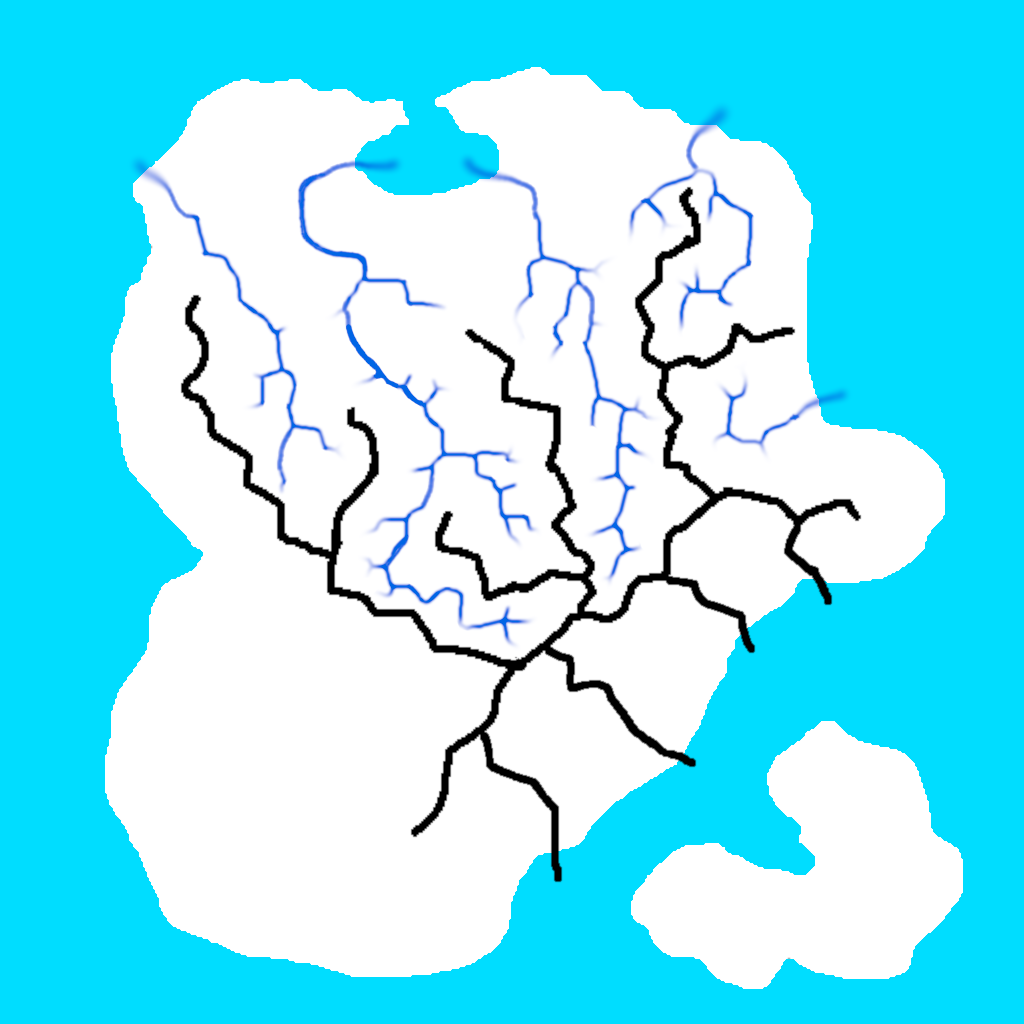
Then I use nodes to work on this base and turn the images into terrain features, add details, remove depressions created by the random noise, and dig the river beds. Since it’s a non-linear process, I can update the base images and re-generate everything.
To make the rivers layer I’ve used a node of Hesiod “Select valleys” that automatically detects the valleys. The generated image was not clean enough however, and I needed to extend the rivers until the sea, so I edited the image in Gimp and re-imported it in Hesiod. This is not really a good process since I’d need to do it again by hand if I change anything that could move the valley bottom (even the random noise), but it works for now.
Here is the last version so far. The most difficult part is to get coherent river beds (always going downhill, even though the terrain is partly made of random noise).
It’s not finished, but I think it looks cool for a starting point, to define scales and place the main elements.
And here is how it looks in the game, and also with the fluid simulation to have actual rivers infinitely flowing from the sources I’ve placed, until it gets to the sea.
It’s still very empty, but there should be some potential for interesting perspectives.
I’m not completely satisfied with the results though, and I think I have an issue somewhere that makes things smoother than it should, but it still gives a good base terrain to work with. It will necessarily be an iterative process, for example so far I didn’t add trees or rocks, so I can’t really grasp yet what works, what is good enough, and what will need to be improved.